
Reset the mysql root account password through 网站管理助手4.0.
Published: 2014-04-14
Note: The following method can only be used if the mysql environment was configured through our Website Management Assistant:
1. Open the Website Management Assistant, click “System Settings” — “Global Parameters”. As shown in the figure: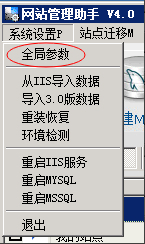
2. In the mysql_root password field, enter the new password you want to set, and click Try to Reset. As shown in the figure: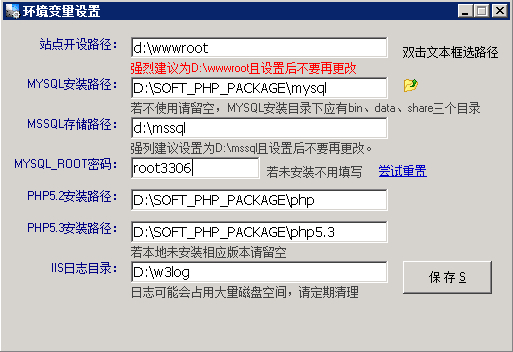
After clicking, it may take a few seconds. After the reset is successful, click Save.If the reset fails, please check whether the permissions on the mysql directory are normal and whether the mysql service is started.
If the above method cannot reset successfully, please try to reset using the tutorial at the following link:
http://www.west.cn/faq/list.asp?unid=571