
iis6 manually configure single-site pseudo-static (applicable to vps cloud host server)
Published: 2013-12-31
This tutorial generally applies to clean-version systems. For servers with our company's assistant installed, please configure according to http://www.west.cn/faq/list.asp?unid=650
1. As shown in the figure: Please first download the component and extract it to drive D http://download.myhostadmin.net/rewrite3.rar

2. Copy the folder rewrite3 to the site directory where pseudo-static needs to be configured, such as d:\wwwroot\test\rewrite3, and check whether the directory includes network service permissions. At minimum, read permission must be granted. If not, please add it

3. Modify httpd.conf, add the corresponding rules into it, and follow the prompts. By default, the configuration file does not include rewrite rules. For common program rules, please refer to "Rule Examples.txt"
4. Load the component. Open IIS Manager on the desktop, and right-click Properties on the corresponding site
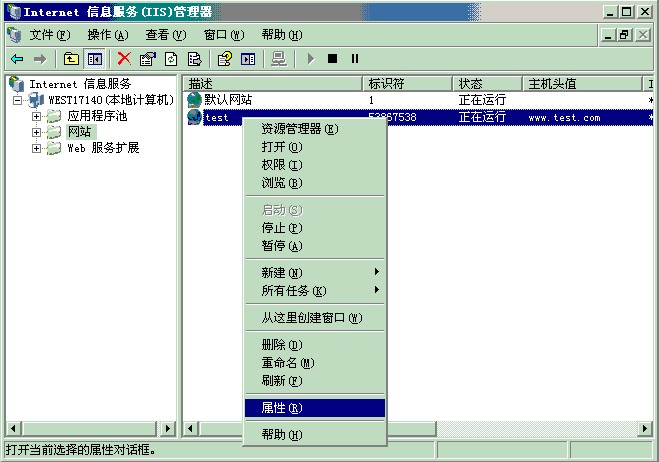
5. In ISAPI Filters, select and load Rewrite.dll

6. After confirming, you can test the website rewrite function
Note: Rule debugging is a very complex process. If you still cannot handle it, please submit a ticket on our company's website, and our company can handle it for you!