
Real-time bandwidth query and handling method for windows2003 system VPS/cloud host
Published: 2012-03-05
Bandwidth and Traffic Query Methods:
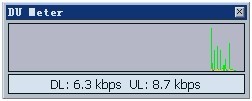
Our company's VPS/cloud host is equipped with theDU traffic viewing tool, which can view real-time inbound and outbound traffic. If you find that it is equal to or greater than your server's bandwidth peak for a long time, (e.g., your bandwidth peak is5m, hereDL or UL is equal to or greater than5mbps for a long time), please upgrade your server bandwidth in time. If the average bandwidth usage exceeds 80% of the peak, then in this case most customers will feel that access is very laggy (generally at least 20% or more redundant bandwidth should be reserved).
In addition, it is recommended to immediately check your site and visit volume. If the visit volume is not large, there may be hotlinking of site resources or other reasons. (Generally, the most common situation is mp3 files being hotlinked by Baidu.)
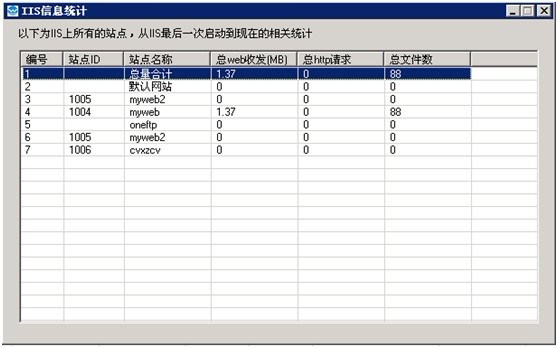
If you want to view the traffic situation of each site in IIS, you can open the website management assistant and click "Traffic Statistics", as shown in the figure:

If you need more detailed statistics, you can download http://downinfo.myhostadmin.net/iis-Monitor.rar software to perform statistics.
Through the total web send/receive size, you can see which site has large traffic and make rectifications.
Methods for Handling Abnormal Traffic:
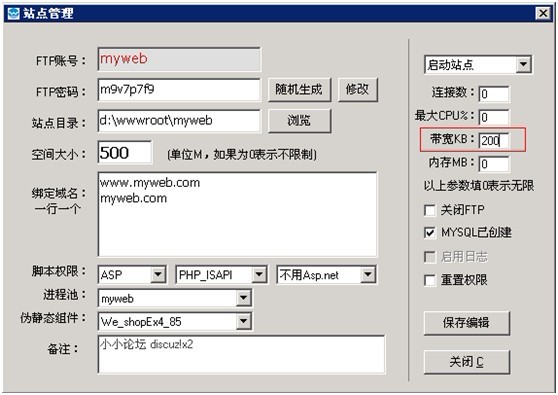
If you find that a certain site occupies too much bandwidth, you can set the bandwidth size in the website management assistant, as shown in the figure:
If you find that the number of site visitors is not large, but the traffic usage is very large, you can enable access log checking. If you find that the access volume of some rar or mp3 files is very large, it may be that site resources are being hotlinked (generally, the most common situation is mp3 files being hotlinked by Baidu). In this case, it is recommended to delete the mp3 files or rename them. In addition, you can use rewrite settings to prevent hotlinking: http://www.west.cn/faq/list.asp?unid=553
Increase Bandwidth:
At present, our company has enabled the function of independently increasing bandwidth. If your traffic is relatively large and has exceeded 80% of the default bandwidth of our products, it is recommended that you increase bandwidth to obtain better access and promotion results.
Bandwidth increase prices for each data center:
China Telecom data center 100 yuan/M/month minimum 3M
Henan Netcom data center 180 yuan/M/month minimum 2M
Guangdong Telecom data center 150 yuan/M/month minimum 2M
Hong Kong data center 700 yuan/M/month minimum 1M
US Los Angeles data center 150 yuan/M/month minimum 2M
Beijing Zhaowei data center (only for enterprise customers) 200 yuan/M/month minimum 2M
West.cn dual-line data center 150 yuan/M/month minimum 2M
Beijing BGP dual-line data center 200 yuan/M/month minimum 2M
Hong Kong and Taiwan data center 280 yuan/M/month minimum 2M
US Los Angeles (Linux platform) 150 yuan/M/month minimum 2M
US SK data center 280 yuan/M/month minimum 2M
Linux system VPS/cloud host real-time bandwidth query and handling methods:http://www.west.cn/faq/list.asp?unid=588
How to test whether my server's bandwidth is dedicated 10M:http://www.west.cn/faq/list.asp?unid=378