
Real-time Bandwidth Query and Handling Methods for Linux VPS/Cloud Hosts
Published: 2012-03-05
Bandwidth Query Method:
To view real-time bandwidth usage, you need to install software and log in tossh to view via commands. To installvnstat, the command is as follows:
wget downinfo.myhostadmin.net/vnstat-1.10.tar.gz
tar xzvf vnstat-1.10.tar.gz
cd vnstat-1.10
make && make install
Commonly used traffic viewing commands:
vnstat -l -i eth0 View real-time traffic
vnstat –tr –i eth0 View average traffic over the last five seconds

Rx Data received
Tx Data sent
If you find that it has exceeded your server's bandwidth peak for a long time (e.g., your bandwidth peak is5m, hererx or tx is greater than5Mbit/s for a long time), please immediately check your site. There may be excessive site traffic or abnormal access.
Abnormal Traffic Handling Methods:
If you only have a few sites, you can directly use thewdcp management platform to limit the bandwidth of each site and enable anti-leech protection.
Log in to thewdcp system, click "Website Management" — "Site List", edit the site that needs to be modified, set "Connection Thread Speed" and anti-leech file types. Separate multiple file types with"," then click Save, as shown in the figure:

After the settings are complete, please restart theweb service for the settings to take effect.
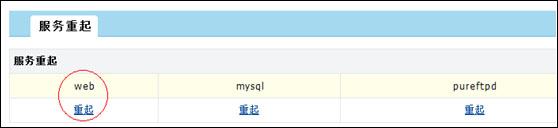
Click "System Management" — "Service Restart", select the "web" service to restart. As shown in the figure:
If you have many sites, you can check which website is causing excessive traffic. This is rather troublesome. The process is as follows:
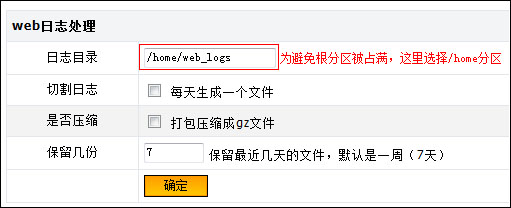
The system does not create a log directory by default. Open "System Settings" — "System Settings", and in "web log processing" set a log directory. It is recommended to set it to/home/web_logs , then click OK. As shown in the figure:
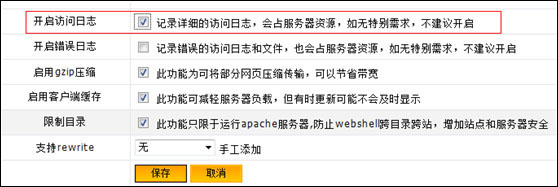
Log in to thewdcp management system, open "Website Management" — "Site List", and click "Edit" in the operation column. Check the box after "Enable access log", and click "Save", as shown in the figure:
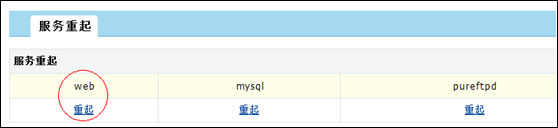
Click "System Management" — "Service Restart", select the "web" service to restart. As shown in the figure:
After restarting, you can view site access logs in the/home/web_logs directory. Use the access logs to determine which site has abnormal access. If the access logs are all image file accesses, it may be hotlinking. Please set up anti-leech protection for the site in the wdcp system according to the anti-leech handling method above.
Linux bandwidth limiting commands: (The following command limits the speed of the seth0 network card to 5m/s. If you want to limit it to 3m/s, just change 5mbit in the command to 3mbit.)
tc qdisc add dev seth0 root tbf rate 5mbit burst 50kb latency 70ms
echo tc qdisc add dev seth0 root tbf rate 5mbit burst 50kb latency 70ms>>/etc/rc.local
Increase Bandwidth:
Currently our company has enabled a self-service bandwidth increase function. If your traffic is relatively large and has exceeded 80% of our product's default bandwidth, we recommend increasing bandwidth to obtain better access and promotion results.
Operation process: Management Center - Business Management - Server Management - Manage - operate in Increase Bandwidth.
windows2003 SystemVPS/Cloud Host Real-time Bandwidth Query and Handling Methods:http://www.west.cn/faq/list.asp?unid=589
```