
Partial Function Description of 西部数码网站管理助手V4.0
Published: 2012-02-24
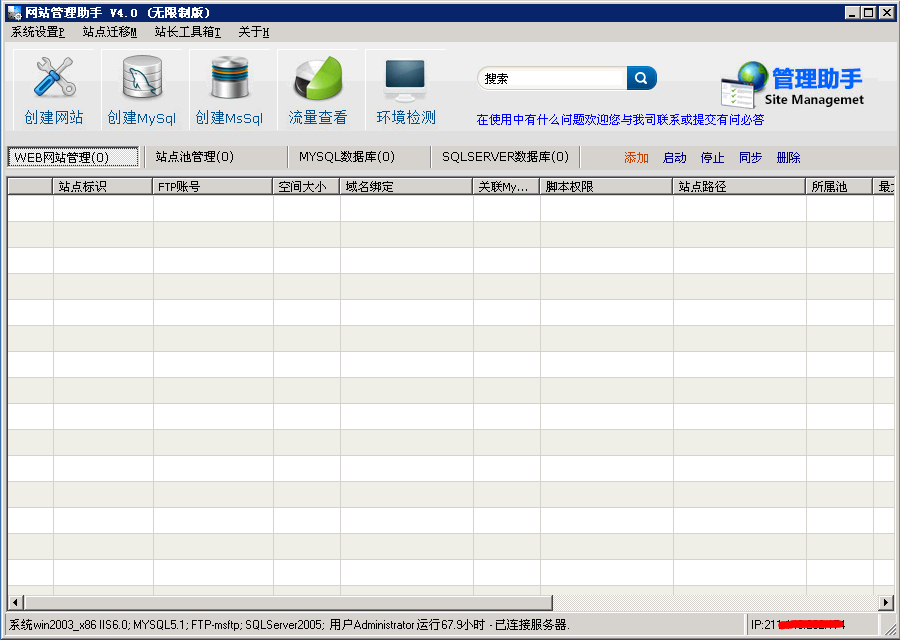
The software interface is as shown:
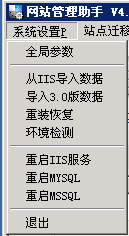
Global parameters:
Site creation path:Can be customized. It is recommended to keep the default. Please do not choose the C drive.
Mysql installation path:It is recommended to keep the default. If you have your own installed version, please select its installation path
Mssql storage path: It is recommended to keep the default.
Mysql_root password:The default is root3306. If you need to change it, enter the new password, and then click "Try reset" on the right.
PHP5.2 installation path: It is recommended to keep the default.
PHP5.3 installation path:It is recommended to keep the default. If it is not installed, leave it blank.
IIS log directory:It is recommended to keep the default. Logs can be enabled when creating a site. After enabling, they need to be cleaned regularly to avoid filling up the disk.
Import data from IIS:This function is not yet available.
Import 3.0 version data:This function is used to import site settings of the Website Management Assistant after upgrading from the original 3.0 version to 4.0.
Reinstallation recovery:This function is used to restore IIS site settings after the user reinstalls the system while retaining data.
 Environment installation detection:It can detect whether the current server and server environments such as IIS and FTP are normal, and can separately install environments such as PHP and mysql. Note: When the environment is normal, do not click to install the environment system, to avoid loss of existing data.
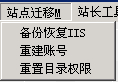
Site migration:
Backup and restore IIS:Used to separately back up IIS or restore IIS site configuration.
Rebuild account:Used to rebuild the server username and password created when creating a website.
Reset directory permissions:Used to reset the directory permissions of created websites. If the user to which the corresponding website directory permissions belong has not been created, you need to create the corresponding user first before performing the reset directory permissions operation.
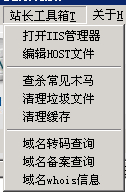
Webmaster toolbox:
Edit HOST file:It can conveniently point a domain name to a specified IP. If saving fails, please check whether the permissions of the hosts file are read-only.
Scan and remove common Trojans:It can scan and remove some common Trojans on the network, and you can also customize Trojan signatures. After scanning, please confirm before cleaning. It is best to make a backup before cleaning to avoid false positives.
Clean junk files:It can clean system temporary files and browser cache.
Clean cache:It can scan and clean a large number of cache files generated by websites, as well as dotted folders or special folders or files that are maliciously created and cannot be deleted manually.
Domain transcoding query:Mainly used to query the transcoding of Chinese domain names or query the Chinese domain name corresponding to the transcoding, as well as the encoding corresponding to the URL.

Create site:Used to create a new site
Createmysql:The user creates a newmysql database. Themysql name refers to:mysql username andmysql database name
Edit site:Select a site. Click Edit Site to edit the site configuration.If mysql was originally created, unchecking "mysql created" will delete themysql database!
Reset password:Used to reset one or moreFTP passwords/mysql passwords
Traffic statistics:Used to count the totalIIS web traffic and totalhttp requests from the last IIS startup to the current time.
RestartIIS:Used to restart theIIS server

Start: Start one or more selected sites
Stop: Stop one or more selected sites
Sync: Sync configuration information of one or more selected sites, includingIIS, ftp, mysql and user account passwords.
Delete: Delete one or more selected sites, Data cannot be recovered after deletion. Use with caution!

Enable: Start one or more selected site pools
Disable: Stop one or more selected site pools
Sync: Sync configuration information of one or more selected site pools.
Delete: Delete one or more selected site pools, Deletion may cause website access abnormalities. Use with caution!

Sync: Sync configuration information of one or more selected mysql databases, including database user account passwords.
Repair: Repair errors in selected databases
Delete: Delete selected databases, Data cannot be recovered after deletion. Use with caution!

Online: Start one or more selected mssql databases
Offline: Stop one or more selected mssql databases
Shrink: Clean up blank database space and useless log records. It is recommended to make a backup before the operation to avoid database corruption caused by misoperation!
Sync: Sync configuration information of one or more selected mssql databases, including database user account passwords.
Delete: Delete one or more selected sites, Data cannot be recovered after deletion. Use with caution!