
Manually deploy SSL certificate on IIS for win2012/win2016/win2019.
Published: 2026-05-14
1. Install Certificate
Download the certificate to the server, and double-click the certificate to start the installation. Note: For the storage location, be sure to select Local Computer.

Click Next until you reach the password screen, then enter the correct certificate password.
Note: Enter the correct certificate password.
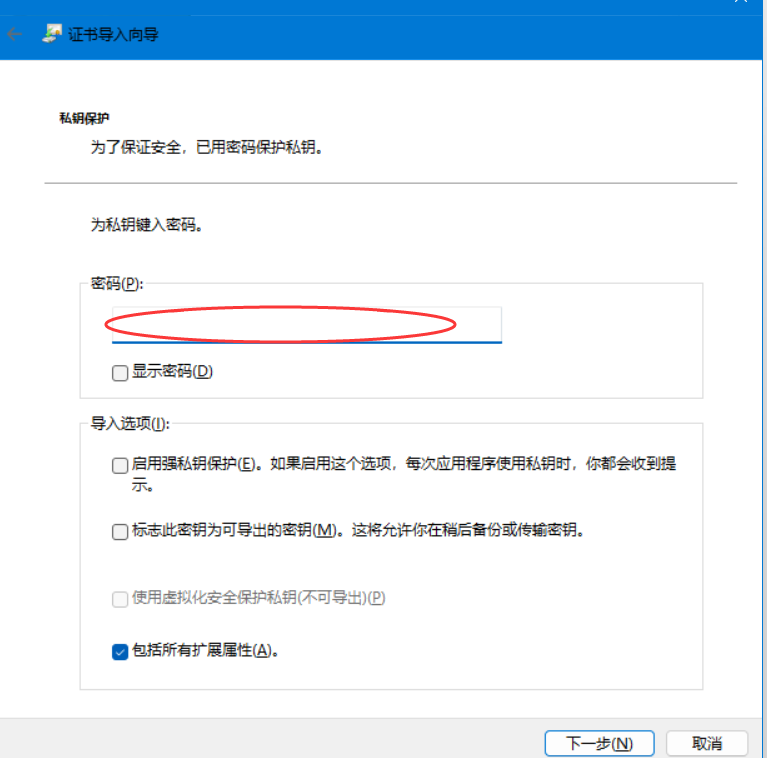
After entering the password, click Next repeatedly until the certificate import is complete.
First import the certificates for the website domains that will enable https into IIS in order.
2. Deploy Certificate
Select the site where the certificate will be deployed, edit the binding, and add the deployment as shown in the image.
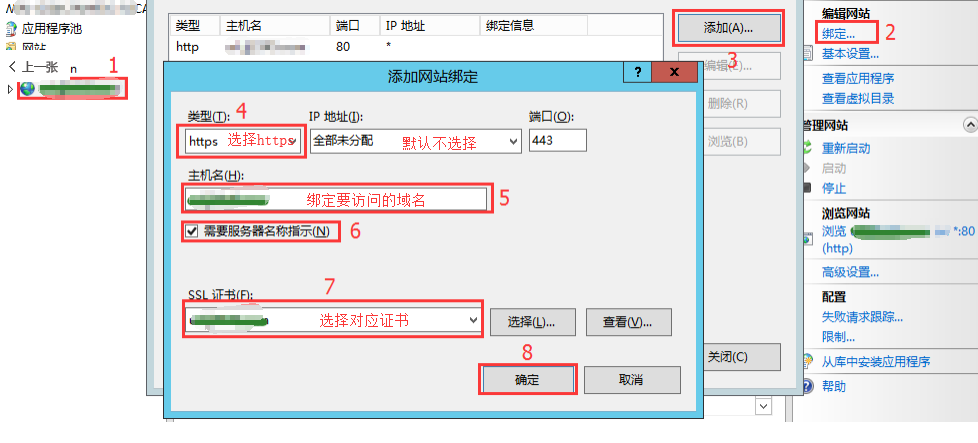
If multiple domains need to enable https,repeat the above steps, select the corresponding domain certificate, and repeat the configuration.
If you are unclear, you can submit a ticket to explain your requirements.