How to enable SPF verification for enterprise email?
Published: 2023-02-24
What isSPF?
(Sender Policy Framework) abbreviation, a technology that authenticates email sender identity by IP address, is a very efficient spam solution.
The receiving mail party will first check the domain's SPF record to determine whether the sender's IP address is included in the SPF record. If it is, it is considered a correct email; otherwise, it will be considered a forged email and returned or directly delivered to spam.
SPF can prevent others from sending spam by impersonating you and prevent emails from being rejected
QQ,163 mailboxes will first check the domain's SPF record. To improve the success rate of domain mailboxes sending emails to external domains (such as QQ,163 mailboxes), it is recommended that you set a TXT record for your domain to avoid this situation.
How to enable SPF verification
Log in with postmaster, click “Mailbox Management” to enter the management interface

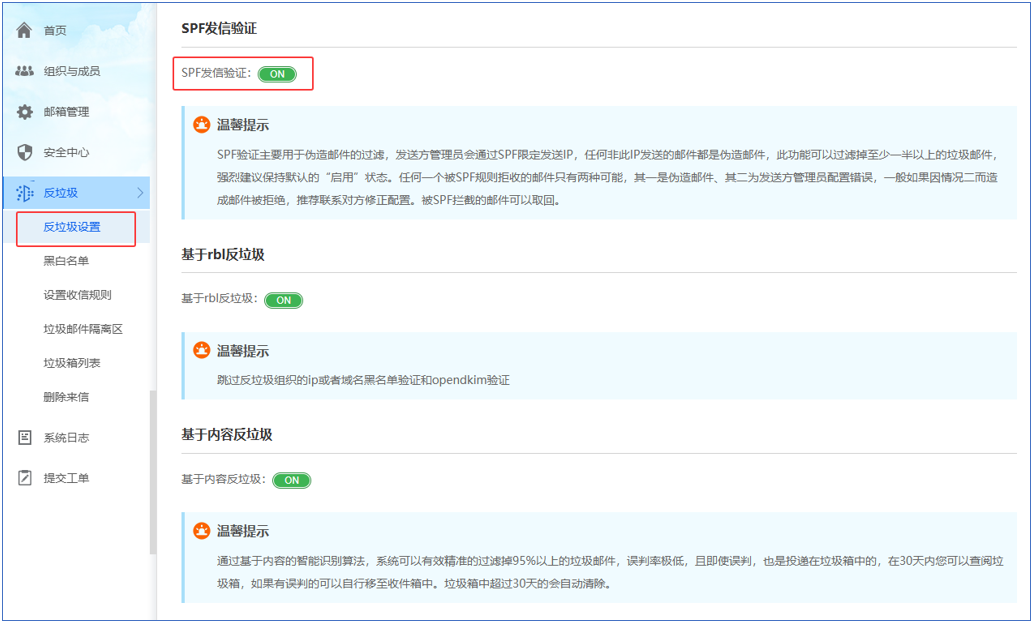
Under [Anti-Spam] -- [Anti-Spam Settings], just enable SPF sending verification. By default, our company's enterprise mail service has already enabled SPF verification.