
Website Traffic Overlimit Troubleshooting
Published: 2021-11-17
When a website experiences Traffic Overage, the analysis and solution approach is:
View website visit statistics---->Combine visit statistics to analyze website access logs---->Determine the cause and take corresponding measures.
Main reasons for abnormal increase in website traffic may include:
Frequent crawling by search engines or AI bots. Countermeasures: Block malicious spiders or Traffic Scrubbing
Images or video files are referenced by third-party websites or search engines, causing extremely high visit volume. Countermeasure: Enable hotlink protection
Traffic growth caused by increased visits to the website itself, such as promotional campaigns or official account articles referencing website images. Countermeasure: Upgrade host model or separately top up traffic
Traffic being artificially increased by PCDN... Countermeasure: Traffic Scrubbing
Invaded by gray industry, with gray-industry files placed in subdirectories, attracting unnecessary visit traffic. Countermeasure: manual cleanup, program upgrades and patching, etc.
Please analyze the cause yourself and take corresponding countermeasures based on your own website's situation, combined with the above possible causes and the data references provided by "Visit Statistics" and "WWW Logs".
If you need our engineers to help analyze the specific cause, please submit a ticket application. Depending on the situation, a fee of 100–200 yuan/site will be charged. Massive log analysis is time-consuming, and different websites have different situations,
For example, search engine crawling is necessary for some users; some users think it doesn't matter and can block it if traffic is too high; others believe it cannot be blocked. Therefore, there is no fixed ready-made answer.
Note: Traffic issues are specific to different websites. A few users may question whether server or data center issues caused abnormal traffic; the answer is no.
Recently, some new situations have indeed appeared, such as frequent access by AI bots, which did not exist before, so websites that previously had very little traffic now suddenly have relatively large traffic,
It may also be a new situation that needs specific analysis. For this kind of sudden traffic growth, if you switch to another service provider, or switch to a cloud server, the corresponding visits/traffic will also follow.
Related products: Introduction to Abnormal Traffic Scrubbing Service Product
I. View Website Visit Statistics
1. Log in to the virtual host management panel, click "Visit Statistics" and "Traffic Analysis",

2.First check browser and non-browser traffic in Visit Statistics to determine the traffic type.

3.Check visit statistics in detail according to traffic type:
3.1If browser traffic usage is high, you can check


and other statistical data to determine which types of files and which url addresses are accessed in large volumes, as well as which IPs and which spiders/crawlers have high access volumes.
3.2If non-browser traffic usage is high, you can check

Determine under what status the non-browser traffic is generated.
II. Analyze Website Access Logs
According to the“Statistics by Date" data in website visit statistics, find a day with relatively high traffic, download the log to local, open it with Notepad editor, and specifically analyze and verify the log.

Usually you only need to find logs from the last three days or so,
windows hosts can click "www logs" to download access logs to the wwwroot directory, then connect via ftp to download to local and open with an editor for viewing.
Linux hosts can connect to the host via ftp, open the logs directory, and download the latest logs.
If you want to download historical logs, you can click “www logs”--“Get Historical Logs”.
III. Countermeasures
3.1 Under normal access conditions, the host's traffic configuration is low, causing overage. For example, data such as file categories occupying traffic, url addresses, search spiders, visiting IPs, etc. are relatively balanced, with no obvious differences.
Please upgrade the host to a model with a larger traffic quota, such as a dedicated virtual host (larger traffic quota), or an unlimited-traffic cloud server.
3.2 Website page data being too large causes traffic overage. For example, if images loaded on the homepage are too large, and the image design is too large, you can contact the website programmer to reduce the number of images on the page,
reduce image size, etc., or upgrade the host to a model with more traffic.
3.3 Certain types of files are requested/downloaded in large quantities, causing overage. For example, website images, mp4, etc. files are hotlinked/downloaded externally; you can enable the hotlink protection function. If traffic is still high, consider storing the files on other third-party websites for reference, or upgrade the host to an unlimited-traffic cloud server.
3.4 Other search engine spiders, IPs, useragent, etc. cause abnormal traffic overage. You can block them via web.config or .htaccess.
Block and intercept search engine spider, useragent access crawling, etc.:http://faq.myhostadmin.net/faq/list.asp?unid=662
Block/restrict ip access:http://faq.myhostadmin.net/faq/list.asp?unid=681
3.5 Traffic is usually very small, but suddenly very large traffic comes for one or two days: Is there any event such as a campaign, or an article reposted to an official account and forwarded in large numbers? If not,
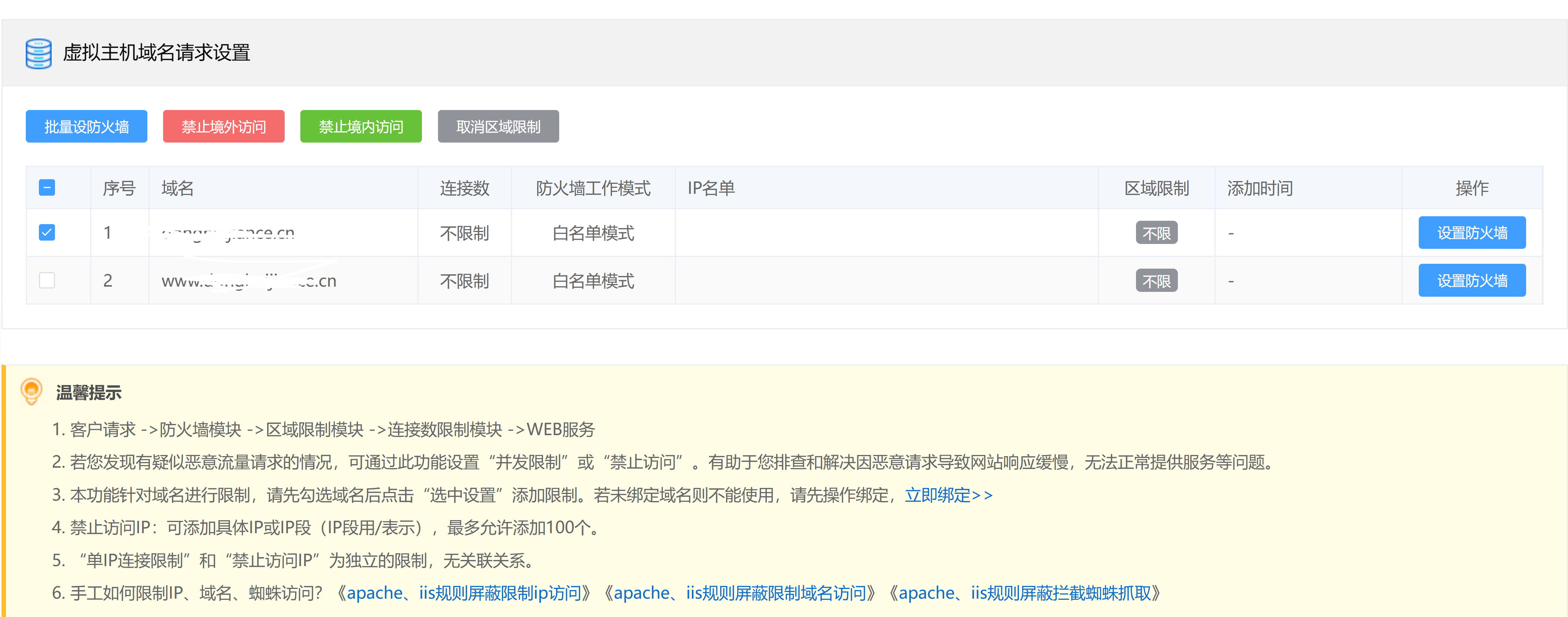
there may be abnormal access traffic from bots or collectors/scrapers, etc. Use the "Request Limit" function in the virtual host control panel:
You can prohibit overseas access, or deny access from certain IP ranges, and also limit the number of simultaneous visits from a single IP, etc.
You can also configure hotlink protection measures: http://faq.myhostadmin.net/faq/list.asp?unid=628 to avoid abnormal high traffic caused by your website's images, mp3 videos and other resources being referenced by other websites. (Note: When hotlink protection measures are adopted, if you directly send links such as website images to users, users cannot access them; related images can only be displayed by normally visiting the website, so as to achieve the purpose of hotlink protection)
3.6 If analysis shows that a certain client UA access request is abnormal, you can block User_Agent (UA) access through web.config or .htaccess rule files:http://faq.myhostadmin.net/faq/list.asp?unid=2595
If the IP and client UA of abnormal traffic frequently change, making manual interception impossible, you can consider purchasing Abnormal Traffic Scrubbing Service
IV. Related Cases
4.1 Low host traffic configuration under normal access conditions


From visit statistics, it can be seen that the file categories occupying traffic are mainly php, js, png, css. The most visited URL is the homepage. There is no abnormality in the volume occupied by visiting IPs, search spiders, etc.
By downloading and verifying the website logs, the logs also contain normal access records with no obvious abnormal requests.
In this case, it is normal access but insufficient host traffic causing overage; the host should be upgraded.
4.2 Website page data is too large


From the statistics, it can be seen that image files occupy the most traffic, and the most visited URL is the homepage.
From the access logs, it can be seen that the number of requested images is large, and through the browser, the images are also relatively large.
In this case, consider optimizing and reducing image size (usually image size should not exceed 300KB), or upgrade the host.
4.3 High non-browser traffic, a certain file is downloaded


From visit statistics, it can be seen that non-browser 206 status occupies a large amount of traffic; the file category is mp4 and the file is relatively large. 206 is resumable download, so it can be judged that it is caused by mp4 files being downloaded.
In this case, consider storing the files on other third-party websites for reference, or upgrade the host to an unlimited-traffic cloud server.
4.3 Search engine spiders/bots, etc. occupying traffic


From visit statistics, it can be seen that Googlebot (google spider) occupies a large amount of traffic.
From the access logs, it can be seen that Googlebot performs a large number of access crawls on a certain address of the website; by reverse lookup of the IP, it is a real google spider.
In this case, if the impact on seo optimization is not considered, googlebot can be blocked through rules. Similar situations may also include Baiduspider (Baidu spider) performing a large number of access crawls on the website.
You can verify whether it is a real Baidu spider, etc. through the source IP. Blocking spider crawling will affect the website's seo optimization, so it is not recommended to block google, baidu spiders.
Please troubleshoot based on the logs yourself, and you can restrict some IPs or spiders by yourself. It is recommended to consider upgrading the host model to solve it, or purchase Abnormal Traffic Scrubbing Service Product for interception and protection.
If you need our engineers to assist in solving it, please submit a ticket; depending on the situation, a fee of 100–200 yuan/site will be charged.