
Preventive measures against WordPress pingback being exploited for outbound attacks
Published: 2016-07-26
Recent observations have found that a large number of WordPress program websites are sending out packets to attack others, causing server resources to be exhausted, bandwidth to be maxed out, and the website to go down directly. After verification, it was caused by WordPress's pingback being exploited, and there are a large number of related records in the logs.

Disable pingback feature
In WordPress Simplified Chinese, pingback is translated as “citation”. Its original purpose is to notify the other party that there is information related to them here. However, it has been widely exploited by hackers for attacks, so it is directly recommended to disable it. Operation method:
Log in to the website admin panel --> Settings--> Discussion --> Allow link notifications from other blogs (pingback and trackback)
Uncheck this option here and save, as shown below:
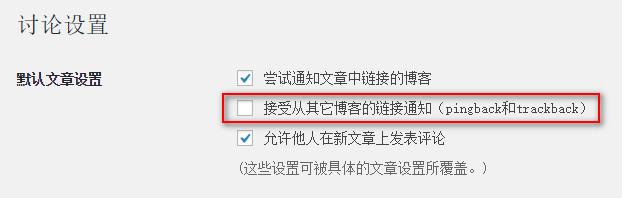
And use phpmyadmin to manage mysql online, and execute the following statement in SQL:
UPDATE wp_posts SET ping_status = 'closed';
In addition, you can add the following code to the functions.php file in the theme directory.
add_filter( 'xmlrpc_methods', function( $methods ) {
unset( $methods['pingback.ping'] );
return $methods;} );
Prevent WordPress pingback attacks on your own website:
To block WordPress pingback attacks, you can use rewrite settings to block WordPress's U-AGENT requests. For rewrite blocking rule reference instructions:http://www.west.cn/faq/list.asp?unid=662 HTTP_USER_AGENT header information line, fill in WordPress.
That is RewriteCond %{HTTP_USER_AGENT} "WordPress" [NC]
Example (rules under Linux):
<IfModule mod_rewrite.c>
RewriteEngine On
#Block WordPress
RewriteCond %{HTTP_USER_AGENT} "WordPress" [NC]
RewriteRule (.*) - [F]
</IfModule>
Using rule blocking cannot completely solve the problem; if the attack volume is too large, it will still cause the website to go down.
```