
How to Modify DNS Settings for 易名中国 Domain Names
Published: 2019-02-10
For domains registered or purchased through transactions at 易名中国, DNS defaults to the DNS servers of 易名中国 (for example: dns1.iidns.com, ) or other domain name servers (unchanged after transfer).
For ease of management, by using the intelligent DNS resolution service of 西部数码, you can change the domain's DNS to the DNS of 西部数码, or to the DNS of other service providers such as 百度云加速, 加速乐, Dnspod, and 51dns.
DNS resolution servers for 西部数码 domains:
ns1.myhostadmin.net
ns2.myhostadmin.net
ns3.myhostadmin.net
ns4.myhostadmin.net
ns5.myhostadmin.net
ns6.myhostadmin.net
When setting DNS, you can set all 6 DNS servers, or set two of them according to your needs.
Address of the 易名中国 domain management platform: http://www.ename.net/
The specific method for modifying DNS for 易名中国 domains is as follows:
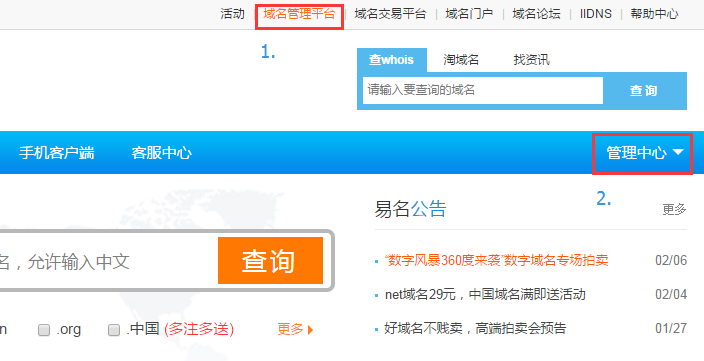
1. 【Log in】https://www.ename.net/domain, click 【Management Center】 on the right side of the navigation bar.
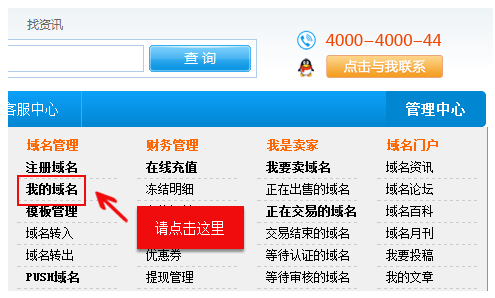
2. In the drop-down menu, find 【My Domains】/or after clicking 【Management Center】, click 【My Domains】 from the left navigation bar.
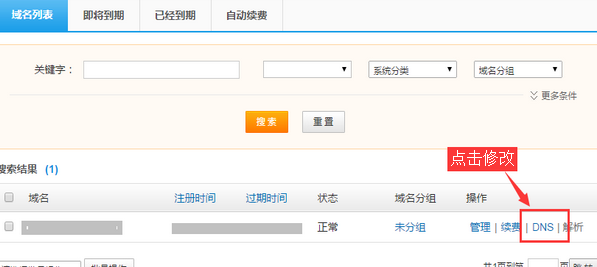
3. After entering the “My Domains page”, find the domain whose DNS you want to modify, and click 【Manage】.
Alternatively, after clicking 【Manage】, on the domain management page, click 【Modify DNS】 at the bottom of the page.
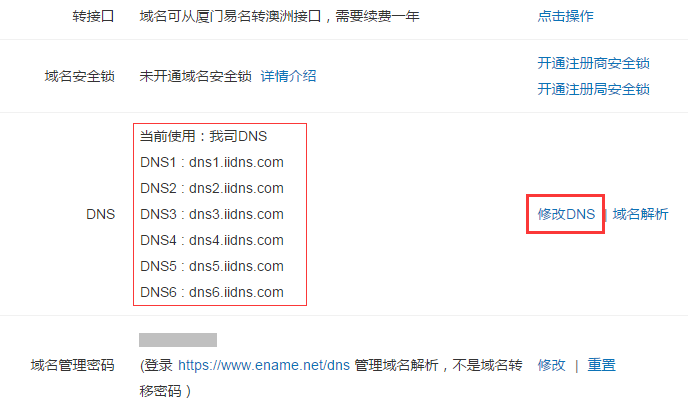
4. On the DNS modification page, select 【Other DNS】, enter the domain DNS server address in the input box, and click the 【Confirm Modification】 button.
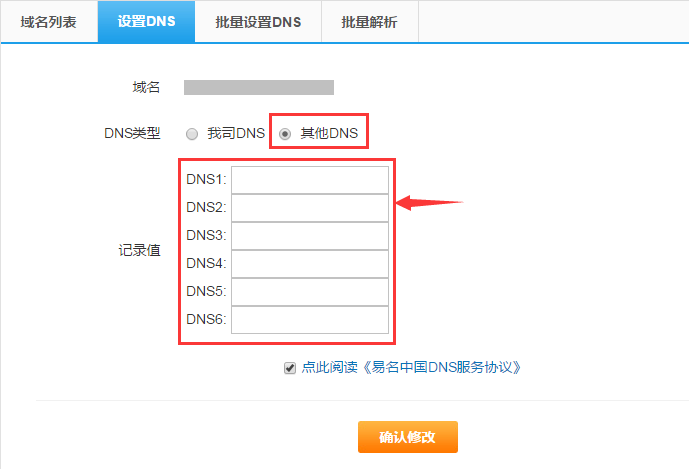
If, after clicking Modify DNS, the domain prompts “Temporary template cannot modify DNS”, it means the domain registration information has not yet been processed. Please first complete template transfer in domain management, then modify the domain DNS.
Domain DNS modifications take effect within 72 hours at the latest.