[Original] wdcp system cannot login, forgot password
Published: 2013-05-10
Our company has two versions. Earlier it was version 1.1, and now all new installations are version 2.x. The reset method is as follows:
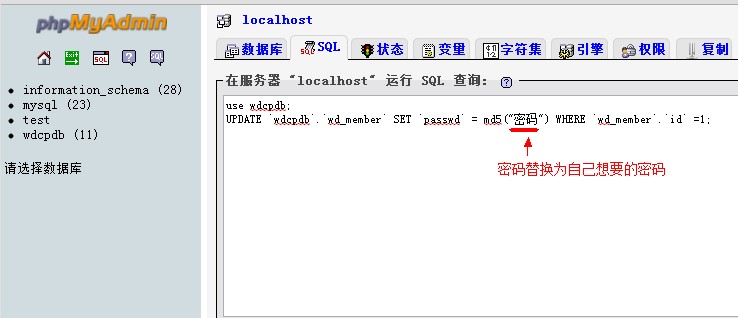
Log in to phpmyadmin to manage mysql online. Add phpmyadmin after the access address to manage it. The account is root, and the password is the initial password (if the root password has been changed, please log in with the modified password). Then execute the following sql statements, and please change xxx to the login password you need.
use wdcpdb; UPDATE `wdcpdb`.`wd_member` SET `passwd` = md5("xxxx") WHERE `wd_member`.`id` =1;
You can also directly replace password as shown in the figure:
If you forget the password, please reset it according to http://www.west.cn/faq/list.asp?unid=571. After resetting, you must modify the /home/wddata/data/dbr.inc.php configuration file, otherwise mysql cannot be created normally. For details, please refer to the second issue in http://www.west.cn/faq/list.asp?unid=653 and modify it.
Version 1.1 vi /www/web/wdcp/data/wd_sys.php modify adm_pass
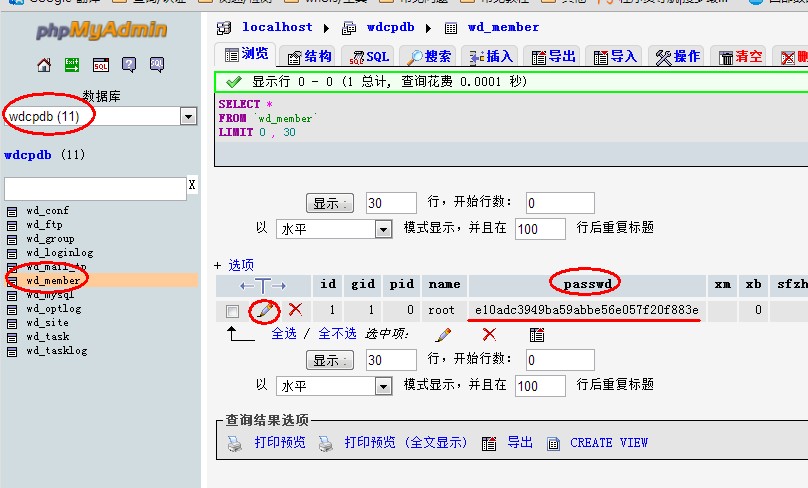
Then, as shown in Figure 2 above, edit the wdcpdb.wd_sys table online, and modify the password in the adm_pass field