
How to extract compressed files online on a VPS/cloud host Linux wd system
Published: 2012-07-17
1. Decompress
First, please log in to the wd system and create a site. For the wd system usage and site creation process, please refer to:http://www.west.cn/faq/list.asp?unid=514
After creating the site, please upload the compressed file to the space directory. Our default directory is: /home/wwwroot/site_name/public_html. The systemsupportszip tar gz archive formats
(Note: The system does not support rar format. Please compress files into zip format locally before uploading. Do not directly rename a rar file).
Click Site List; you can see the site. On the right, there is the corresponding File Management. Click File Management to enter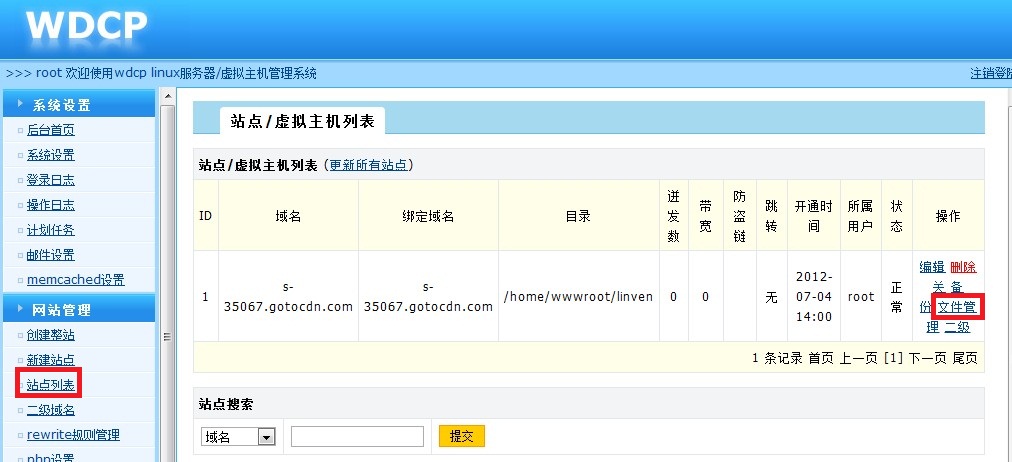
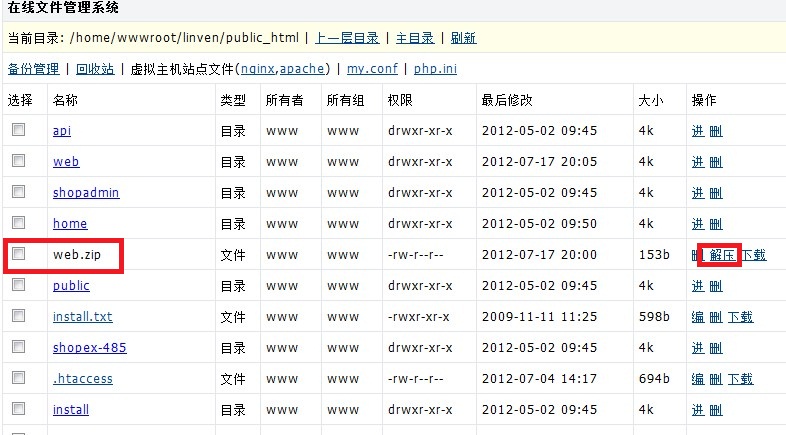
After entering, you will see the public_html directory by default. After clicking into it, you can see the files in the space. For the corresponding compressed package, you will see a Decompress button. Just click Decompress, and the system will decompress the files to the current directory
2. Compress
To compress files, you also need to first enter File Management and open the website directory. You can select files according to actual needs, or click the Select All button below the file list, select Package for Action, and click Confirm. The system will execute the compression command and name the file according to the current time, as shown in the figure:
