
BaoTa Panel Update, Repair and Upgrade Tutorial
Published: 2026-01-28
BT Panel, as one of the most popular server management tools, regular updates not only bring new features, but more importantly, fix security vulnerabilities and improve system stability. However, during actual updates, many users encounter issues such as "Python version is too old" and "environment errors", causing update failures.
This tutorial will systematically explain the correct methods for updating BT Panel and solutions to common problems.
In server management, "stable operation" often makes administrators conservative about updates. However, for complex Web management tools like BT Panel, proactive and planned updates are not a risk, but rather a key measure to avoid greater risks and ensure business continuity. Therefore, it is recommended to regularly update BT Panel to the latest version!
Solutions
We provide you with two repair solutions, from simple to complex. Please try them in order.
Solution 1: Repair through the panel's built-in features (recommended first choice)
This solution uses the panel's built-in repair and update features to resolve most common environment configuration issues.
Log in to your BT Panel management backend.
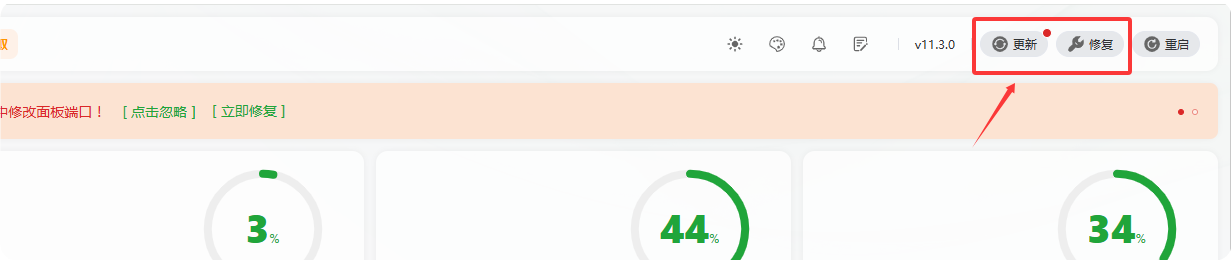
Locate the repair function : In the upper right corner of the panel page, you can see the [Repair] button. Please click this button. The system will automatically execute the environment detection and repair process (as shown in Figure 2).
Execute panel update : If the problem persists after the repair, please click the [Upgrade Update] button in the same area to upgrade BT Panel to the latest stable version. Version updates usually include fix patches for known issues.
Solution 2: Command-line repair via SSH remote connection
SSH remote tutorial: https://www.west.cn/faq/list.asp?unid=417#linux
1. Before repairing CentOS 7 system, first change the repository:
Back up the original YUM repository configuration file
cp -a /etc/yum.repos.d /etc/yum.repos.d.backup
Clean up the original YUM repository configuration file
rm -f /etc/yum.repos.d/*.repo
Download Alibaba Cloud CentOS 7 repository configuration file
curl -o /etc/yum.repos.d/CentOS-Base.repo http://mirrors.aliyun.com/repo/Centos-7.repo
Clear cache and generate new cache
yum clean all
yum makecache
2. After changing, execute the command to upgrade BT Panel to the latest version:
curl https://download.bt.cn/install/update_panel.sh|bash
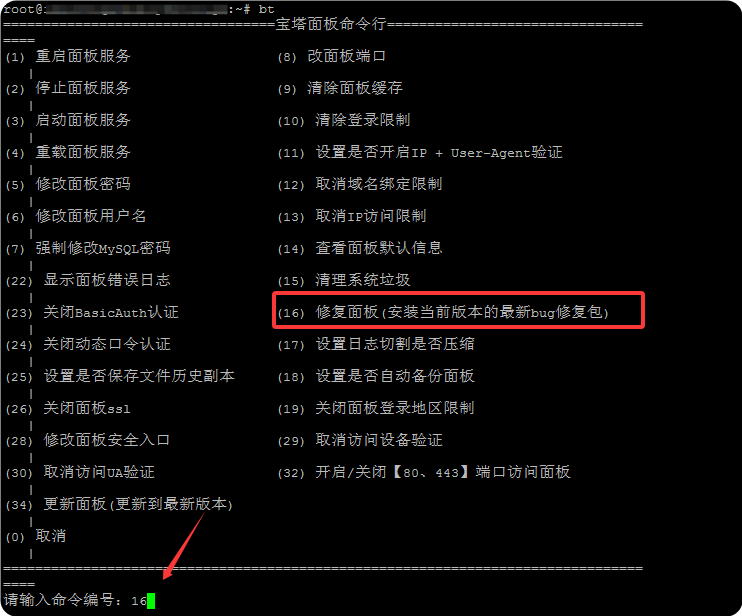
3. If BT Panel still has abnormalities after the update, please execute again:
bt Select 16 to repair.
If the method update reports an error: "Error, the current panel is too old / py-2.7 / no pyenv environment, cannot upgrade to the latest panel" (as shown in Figure 4)
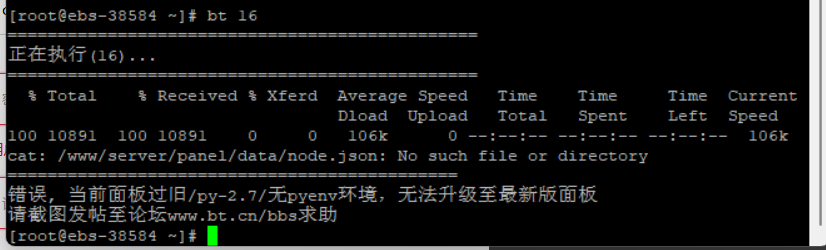
Solution:
Execute the following command in the SSH terminal (not the panel terminal) to repair the panel and back up the previously unusable panel environment (if this step prompts that the file does not exist, please execute the second command)
mv /www/server/panel/pyenv /root/pyenv_bak
Re-obtain the new panel environment and update package
curl http://download.bt.cn/install/update_panel.sh|bash
This update will not affect your data, it only updates the panel program.
Important Notes
Data security : BT Panel repair and upgrade only involve BT-related matters and will not affect website program data.
Problem escalation : If the above two solutions cannot solve your problem, it may be caused by deeper system environment or dependency component abnormalities. We recommend you:
Restart the server and try again.
Provide detailed error logs through the BT official forum or technical support channels for further help.
When upgrading BT Panel version, there may be cases where special plugins cannot be used. For details, please contact the BT forum official for assistance.
If you still cannot resolve it, you can also submit a ticket.